
Seniorverse Care Flow
Clients, scheduling, visit notes, and billing,
all in one system.
Your office books the visit. Your care manager runs it from their phone. The hours reach billing before they are back in the car. You pay for the hours of care you deliver, not for every seat.
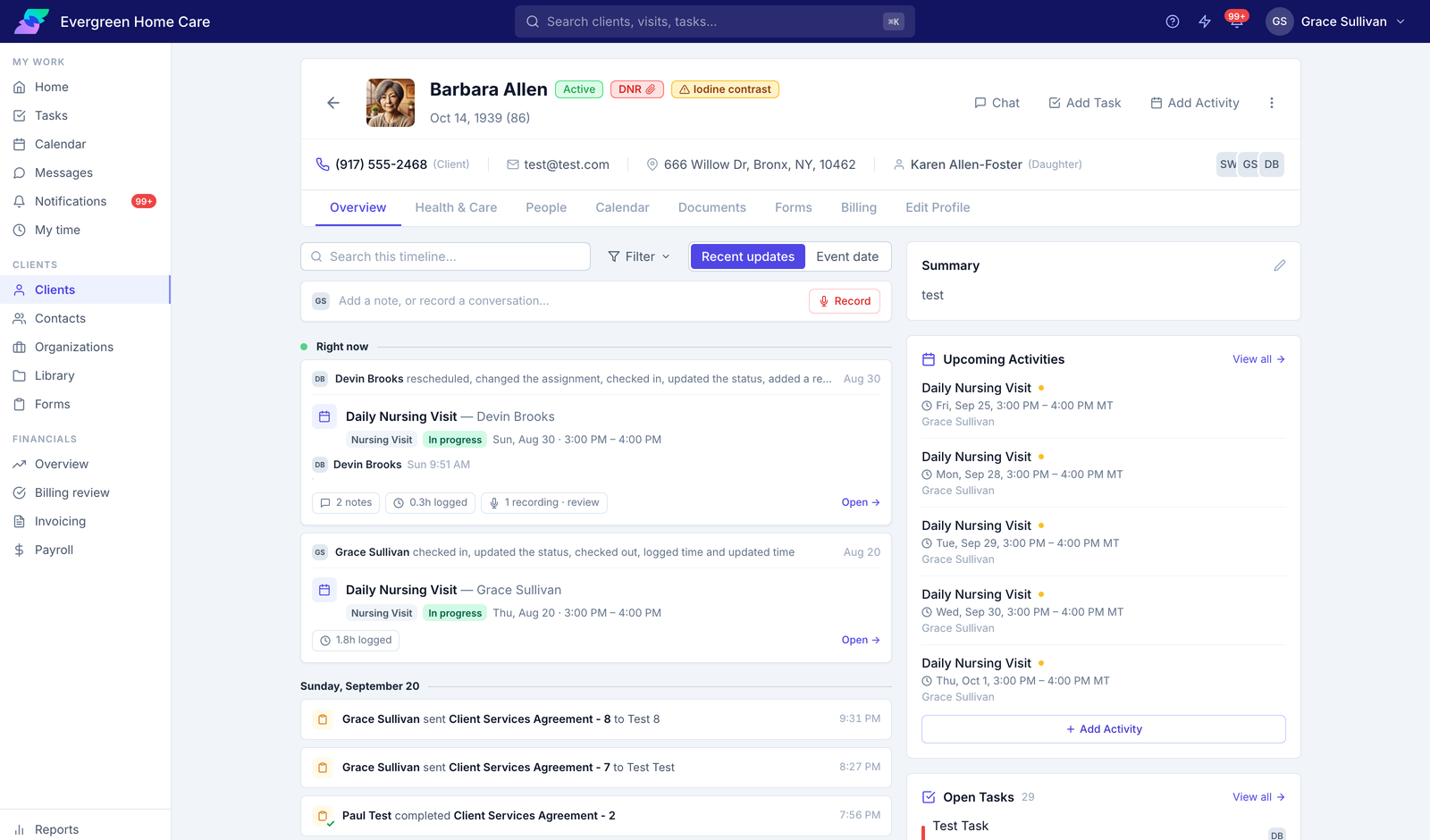
Contacts, care team, health information, documents, and forms sit on one chart. Every visit, note, call, and task lands on the timeline as it happens, so whoever answers the phone can account for Tuesday.
The same work gets done two or three times
Most agencies run on a shared calendar, a spreadsheet, a chat tool, and an accounting package. None of them share anything.
Phone calls go unrecorded
Someone takes the call and makes a task. What was actually said stays in the phone system, so the next person to pick it up starts from nothing.
Notes get written from memory
The visit happens at ten. The note gets written at six, in a chat tool, from whatever the care manager still remembers.
The office re-types the hours
Caregivers are not in the system, because desk software charges by the seat. So their hours get copied into a spreadsheet by hand.
Two exports, two answers
The billing spreadsheet renumbers invoices every time it runs. Last week's copy and this week's copy of the same month do not match.
Your team enters it once. Care Flow does the rest.
Schedule
The office books the visit.
Visit
Your care manager checks in from their phone.
Note
The recording becomes a draft.
Time
Check-out logs the hours.
Billing review
Every hour arrives with its rate.
Invoice
Lock it and it stops changing.
Payment
Your clients pay online.
No spreadsheet in between.
One calendar for the office and the field
Every visit your agency runs, in one place. Filter by staff member, team, client, or visit type to check coverage for the week, and find the visits your team finished but never logged time against.
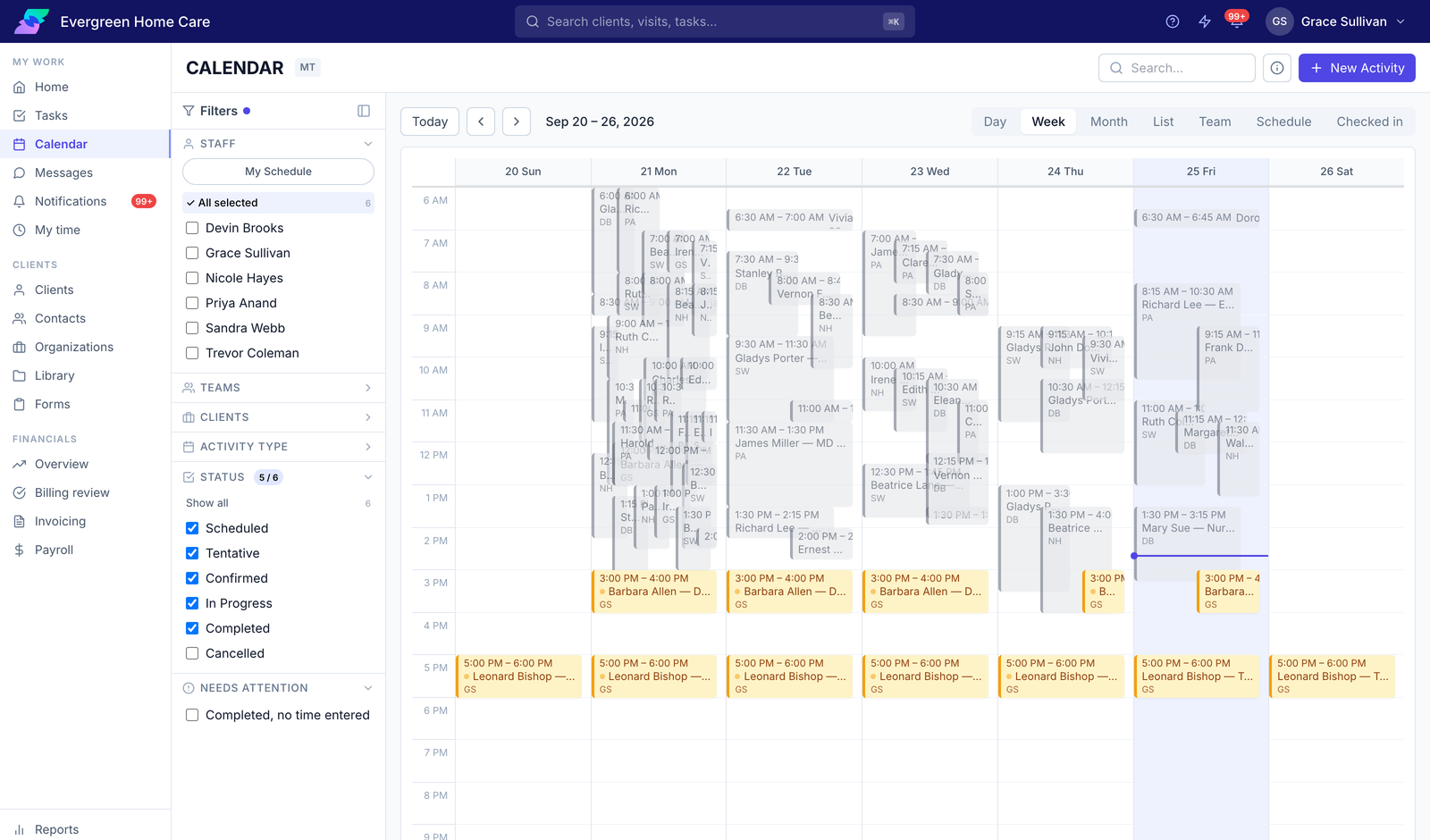
Color tells you each visit’s status: scheduled, tentative, confirmed, in progress, completed, or cancelled. Your staff set their own availability, so when you need to cover an open visit, Care Flow only offers you people who are actually free. The Needs Attention filter lists visits marked complete with no time entered, which is billable work you would otherwise never invoice.
Your team works from their phone
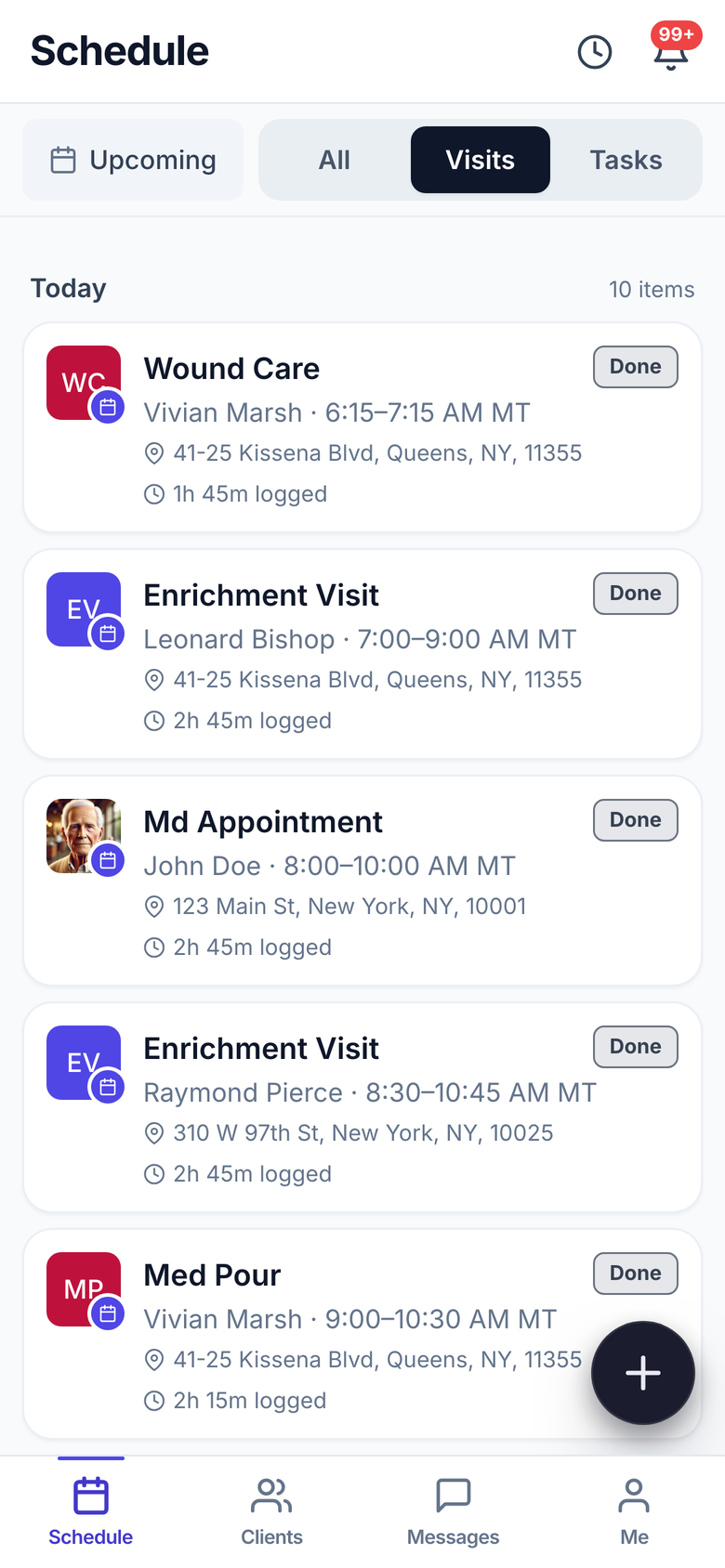
Your care managers open the app to today's visits: who, when, where, and what kind of visit. They check in when they arrive, record the visit if the client agrees, and check out when they leave. Care Flow logs the hours for them.
Each visit shows the client, the visit type, the time window, the address, and the hours logged once it is done. Your care manager sees code status and allergies before they knock. Checking out writes the time straight to the timesheet, so nobody re-enters it later and nothing gets rounded from memory.
- Today's visits, with the address and the time
- Check in on arrival, check out on the way out
- Record the visit with the client's consent
- Leave with the hours logged and the note drafted
Care Flow prices the work. You approve it.
Care Flow picks the billing code from the visit type and applies your rate, so nobody in the field has to choose a code. Review the period, adjust anything that is wrong, then lock it. Locked entries stop changing. Then invoice your clients and collect payment.
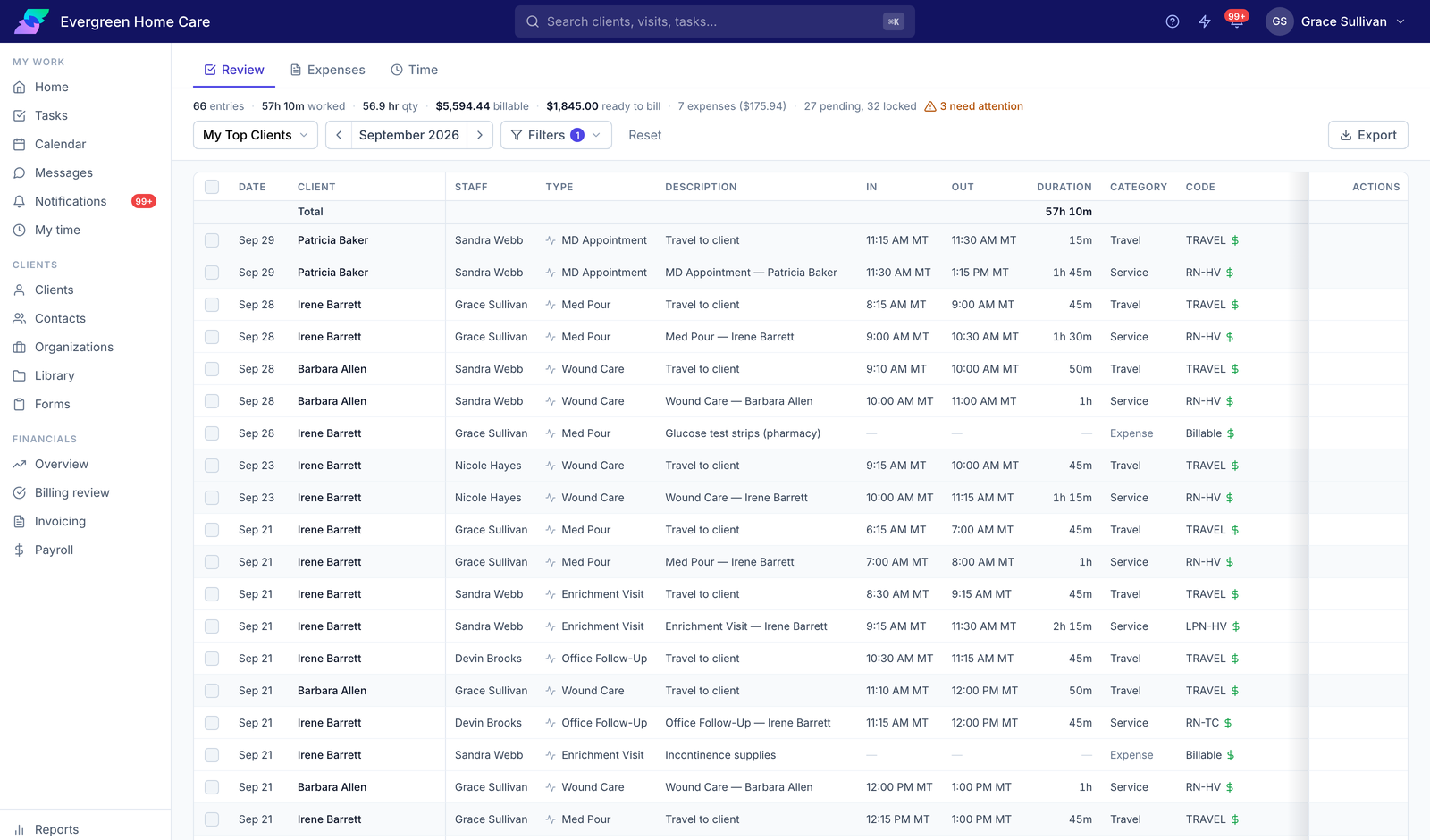
Every entry for the period, with its code, rate, and amount. Service time and travel carry different codes, and expenses sit alongside them. Filter by team, staff member, client, status, or code, fix what needs fixing, and finalize the rest. The totals across the top tell you hours worked, billable hours, and what is ready to invoice right now.
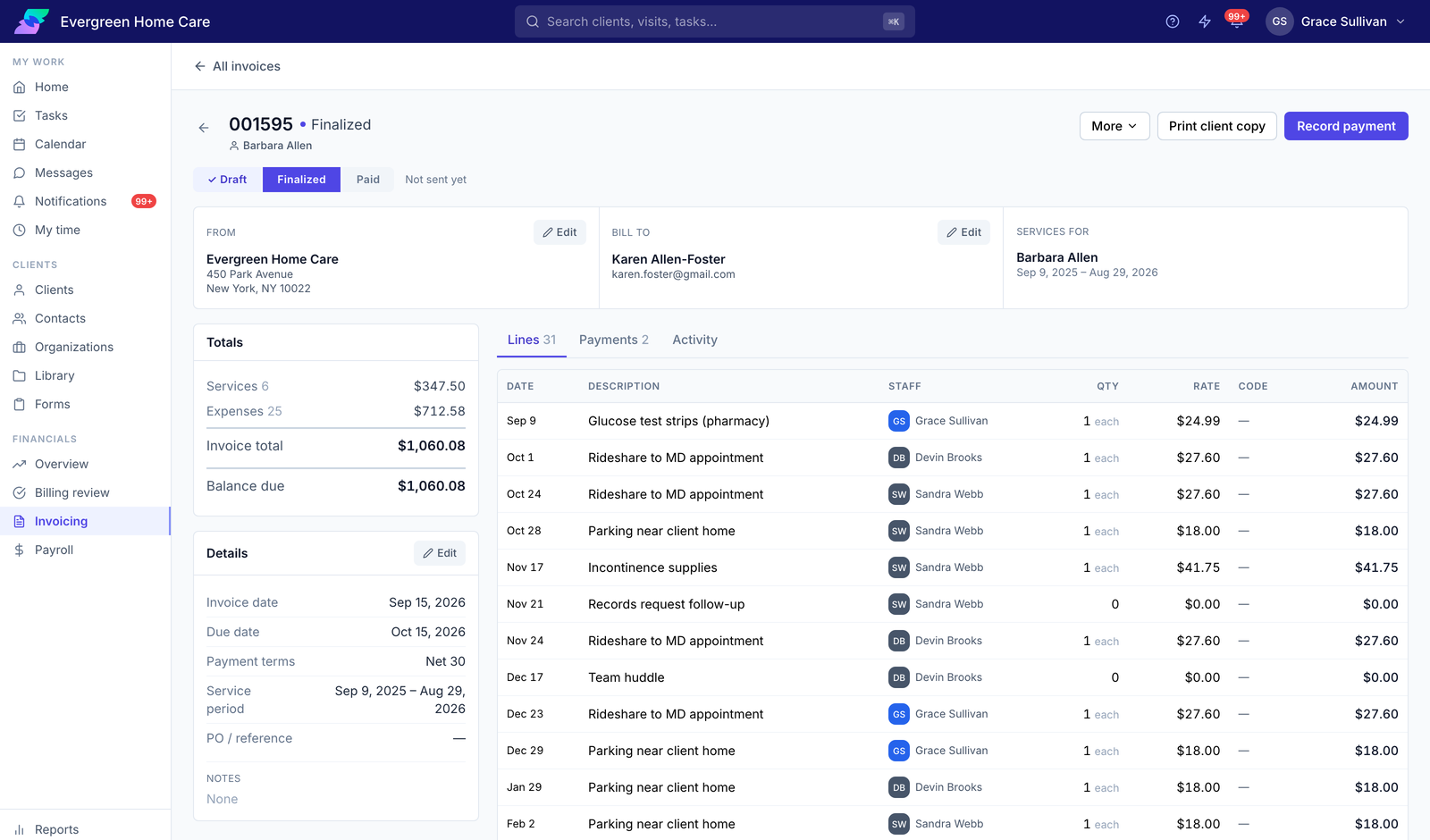
Finalize an invoice and it stops changing. The number, the lines, and the total stay exactly as you sent them. Every line shows the staff member, quantity, rate, and amount. Record payments against it, or print a client copy.
Record the visit, get the note written for you
Your care manager taps record at the start of the visit and puts the phone down. Care Flow transcribes the conversation and drafts the note. They review it and post it before they leave the house.
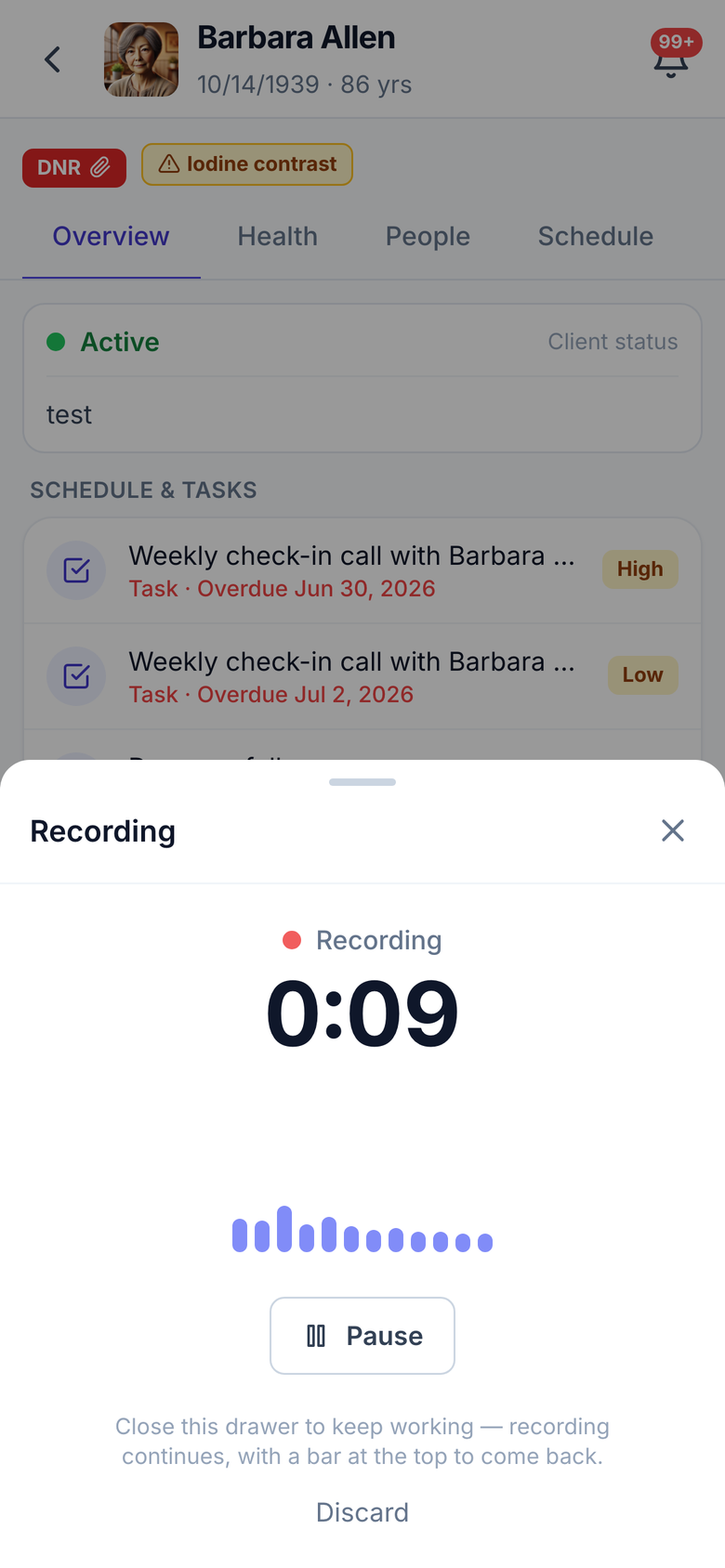
The app shows a consent line before it starts. Your care manager can pause or discard at any point, or close the drawer and keep working while it carries on recording. When they stop, Care Flow transcribes the conversation, labels each speaker, and drafts the note into your template’s sections.
- Tap once to start. Pause or discard whenever.
- Care Flow transcribes it and labels each speaker
- The draft arrives in your template's sections
- Your care manager approves every section before it posts
Consent
The app shows a consent line before recording starts.
Recording
A red banner stays on screen. Pause, resume, or discard at any time.
Transcript
Care Flow transcribes it and labels each speaker.
Draft
Care Flow drafts the note, section by section.
Review
Your care manager accepts, edits, or discards each section, then posts it.
Inside Care Flow
What's included
 Client recordsHealth and care information, the timeline of visits and notes, contacts and care team, documents, and forms. Upload a discharge summary and Care Flow fills in the chart from it.
 SchedulingA calendar for the office and the field. Your staff set their own availability, and Care Flow suggests who can take an open visit. A live board shows who is checked in right now.
 Visit notes and recordingsRecord a visit with the client's consent. Care Flow drafts the note and shows you the transcript beside it. Accept the follow-up tasks it suggests, one at a time.
 TasksAdd a task in plain language. Tasks stay attached to the visit or call they came from. Repeating tasks are supported.
 FormsBuild templates from blocks, share them by private link, and write the answers back to the client record when you review them.
 Time and billingCare Flow codes each visit from its type and applies your rate, so nobody in the field picks a code. Review, adjust, and lock each period.
 Invoicing and paymentsCare Flow builds invoices from locked entries at your current rates. Finalized invoices stop changing. Record payments and credits against them.
 ReportsHours by client, compared with last month. Export your billing data in three formats. A log of every visit, call, and note.
 Setup and permissionsRoles and teams, visit types with their defaults, your own clinical lists, and an oversight page for administrators.
 Mobile appYour team sees code status and allergies before the visit. They check in and check out, and Care Flow logs the time.
Security and compliance
HIPAA compliant
We built Care Flow to hold protected health information, and we sign a Business Associate Agreement with every customer at signup, before you enter any client data.
Encrypted and secured
We encrypt your client data and secure it on our servers.
Roles
You set what each role can see and do, and change it person by person.
Access log
Every time someone opens a client record, we log who, what, and when.
What it does not do
Three things to know before you start.
- It is not a clinical record. No eMAR, no regulatory care plans, no incident reporting.
- It does not bill Medicaid. No claims and no EVV submission. Home care agencies that bill private pay can use it today.
- It does not connect to your accounting or payroll system. Care Flow handles invoices and payments itself. Export your hours and billing data for whatever you use elsewhere.
Pay for care, not seats
Both plans include every feature. What changes is how many people can use it. A twenty-person agency on Team pays for the hours it delivers, not twenty licenses.
| Solo | Team | |
|---|---|---|
| For | One care manager working on their own | An agency: the office and everyone in the field |
| Price | $79 a month | $349 a month |
| Users | Just you | Unlimited. Every office user and every caregiver. |
| Care hours included | 80 a month | 580 a month |
| Additional hours | $0.99 each | $0.60 each |
| Team messaging | Not included | Person to person, and per client |
| Document storage | 25 GB | 100 GB |
| Term | Month to month | 12-month agreement, billed monthly |
| Free trial | 30 days, no card | 30 days, no card, on request |
Every Solo account is its own organization with its own client list. Three of them cannot see each other's clients, so nobody can hand a visit to a colleague, put a second name on a care team, or cover a Tuesday when someone is out. The office has no schedule to look at, because there are three.
Team is one organization. You assign visits and tasks to whoever is taking them, build a care team around each client, run one calendar, and message each other and about a client. That is the difference between three people who each have software and an agency that runs on one system.
The money works out too. Three Solo accounts are $237 a month for 240 care hours. Team is $349 for 580, and every hour past that costs $0.60 instead of $0.99.
An hour of care is logged service time. Travel and admin time do not count. No setup fee. Client payments collected through Seniorverse carry a processing fee. Agencies with more than one location, or over 3,000 hours a month, should talk to us.
No card required. Every feature is on, and we charge nothing unless you subscribe.
Getting started
We set it up with you
Your rates, visit types, and document folders arrive pre-configured. Adjust them to match how you already bill.
Import your clients
Bring them in from a spreadsheet and preview the result before you commit it. Or add them one at a time.
Add your team
Logins for the office, the mobile app for the field, and a help center for both. Add everyone: users are unlimited.
Log visits from day one
Log your first visit today, and your first billing period is waiting for you at month end.
"Our goal is to not use any other platform except for Seniorverse."
Try Care Flow free for 30 days
No card required. We charge nothing unless you subscribe.